
RSS Feed
Monitor and display one or more generic RSS, ATOM or JSON feeds.
Using the RSS standard, you can integrate most News websites, applications and more on your dashboard. Compact mode uses a vertical card list and keeps enclosure images as the familiar poster and blurred backdrop.
Screenshots
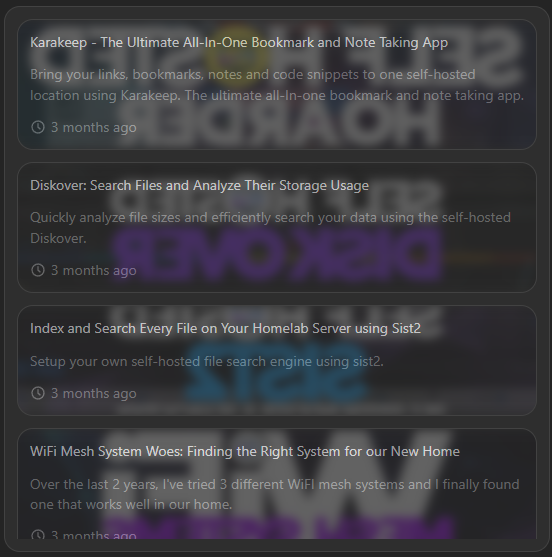
Advanced view keeps the configured feeds and post limit unchanged while showing each fetched post's full description, image, source, relative time, and exact publication timestamp. Right-to-left text and safe external links continue to follow the widget configuration.
Supports advanced view. See the advanced keyboard shortcuts.
Adding the widget
Add the widget from the board's Add board content menu in edit mode.
Configuration
| Name | Description | Values | Default value |
|---|---|---|---|
| Feed URLs | A list of RSS feed URLs. They must conform to one of the following standards RSS, ATOM or JSON Feed. | List of URLs | Empty list |
| Enable RTL | Enable right-to-left layout for feeds in such languages | yes / no | no |
| Description line clamp | Maximum number of lines to show for the feed description | 1-50 | 5 |
| Amount posts limit | Maximum number of posts to show | 1-9999 | 100 |
| Hide description | Hide the description of individual feeds | yes / no | no |
| Show poster image | Show the poster image beside the content | yes / no | no |
If one configured feed fails, the widget keeps entries from healthy feeds visible and shows a warning. If a refresh fails after entries have loaded, the previous entries stay visible with a stale-data warning.
Examples
Here's a small collection of examples, that you can use for testing or actual use (in no particular order):
- https://noted.lol/rss/
- https://blog.google/products/chrome/rss/
- https://www.w3.org/blog/feed/
- https://partner-feeds.beta.20min.ch/rss/20minuten
- http://rss.cnn.com/rss/money_topstories.rss
- https://www.wired.com/rss/
- http://www.chinadaily.com.cn/rss/world_rss.xml
- https://www.srf.ch/news/bnf/rss/1646
- https://torrentfreak.com/feed/
- http://rss.nytimes.com/services/xml/rss/nyt/HomePage.xml
- http://feeds.foxnews.com/foxnews/latest
There is a good list of feeds here: https://github.com/greysonp/rss-feeds/blob/master/feeds.json