
Docker stats
Containers
Stats of your containers
Displays container resource usage and management actions for Docker environments configured through environment variables.
This widget does not use an integration from Management → Integrations and is restricted to administrators.
Screenshots
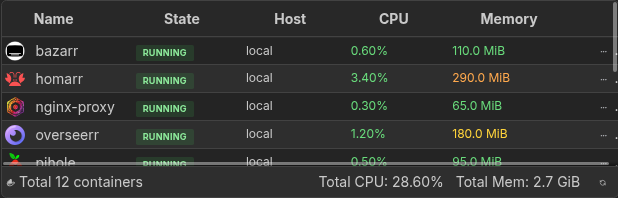
Interactions
Column order and width are saved per widget. These controls are unavailable while the board is in edit mode.
Each container row has an action menu, accessible via the three-dot icon or by right-clicking the row, with the following options:
- View logs - opens a dedicated terminal page streaming the container's logs
- Start / Stop / Restart - manage the container's state
- Remove - permanently remove the container after a second confirmation click
- Add to Homarr - create a bookmark app from the container
Adding the widget
Add the widget from the board's Add board content menu in edit mode.
Configuration
| Name | Description | Values | Default value |
|---|---|---|---|
| Docker environments | Select one or more automatically discovered Docker environments, or leave empty to show all | Any Docker socket or host configured for Homarr | All Docker environments |
| Columns to show | Select which columns are visible in the table | Name, State, Host, CPU usage, Memory usage, and Actions | All columns |
| Enable items sorting | Allows to sort containers by clicking on the column headers | yes / no | No |
| Column used for sorting by default | Select which column to use for sorting the containers when the widget is loaded |
| Name |
| Invert sorting | Invert the sorting order (ascending / descending) for the default sorting column | yes / no | No |