
Media Request List
Media requests
See a list of all media requests from your integration
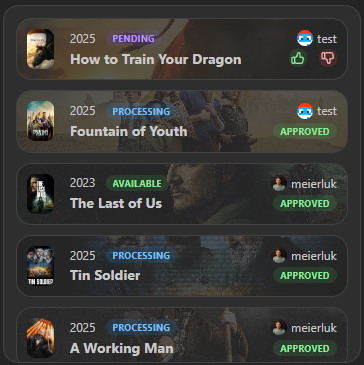
Provides a list of all open and recently closed requests. It also provides the functionality to approve or reject requests. Compact request cards retain their full artwork, request metadata, title, status, and permitted actions.
You can limit the list to specific request statuses (for example, only show pending) and restrict it to requests created within the last N days.
Screenshots
Supported Integrations

JellyseerrJellyseerr is a self-hosted media request management system that integrates with Jellyfin and other media servers.

OverseerrOverseerr is a self-hosted media request management system that integrates with Plex.

SeerrSeerr is a self-hosted media request management system that integrates with various media servers.
Interactions
- Approve / decline a request by clicking on the thumbs up or down icon.
- Hover over the widget to reveal a search button that opens Spotlight in media request search mode, scoped to the widget's integrations.
- When no requests exist yet, the widget offers the same media search action instead of reporting an integration error.
- A warning indicator identifies unavailable integrations without hiding requests returned by healthy integrations.
Adding the widget
Add the widget from the board's Add board content menu in edit mode.
Configuration
| Name | Description | Values | Default value |
|---|---|---|---|
| Open links in new tab | If enabled, links will open in a new tab. | yes / no | yes |
| Statuses to show | Only requests with these statuses will be shown. Defaults to all statuses. | List of: 'pending', 'approved', 'declined', 'failed', 'completed' | All statuses |
| Show only recent requests | Limit to requests created within this many days. Set to 0 to disable the time filter. | 0-365 | 0 |