
Model Context Protocol (MCP)
Connect an AI client to Homarr to manage boards, apps, integrations, and other services through MCP tools.
Homarr uses MCP v2 (protocol 2026-07-28) at /api/mcp, with compatibility for 2025 Streamable HTTP clients.
Requests are stateless: each request authenticates independently, without an MCP session ID.
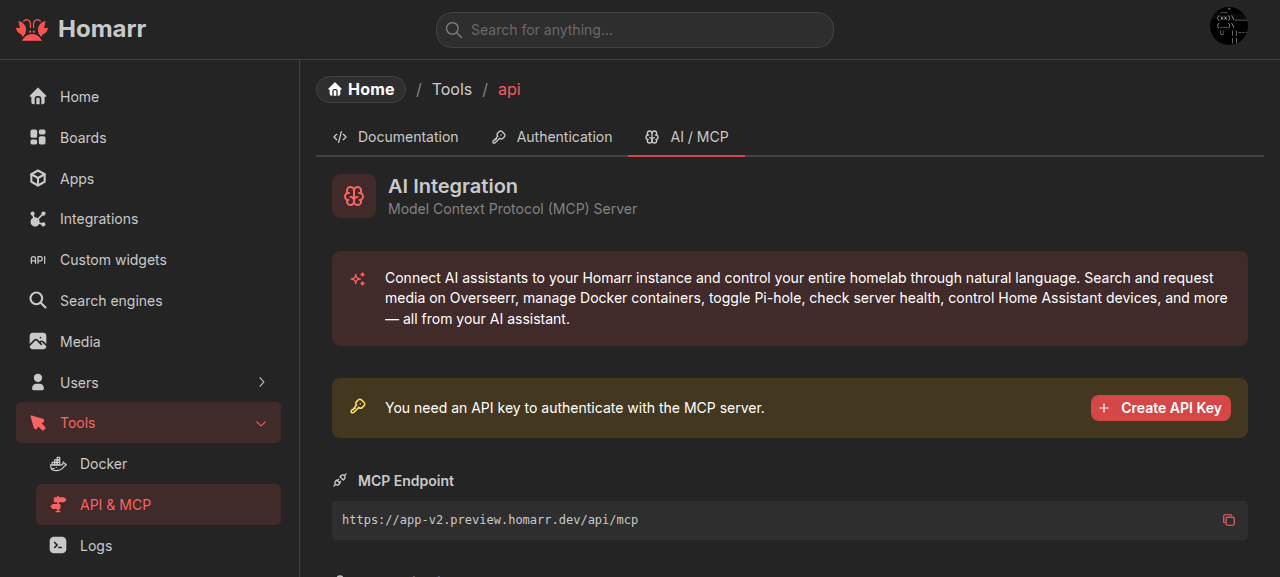
Connect a client
Create an API key under Management → Tools → API → Authentication. Add this configuration to your client, replacing the URL and API key:
{
  "mcpServers": {
    "homarr": {
      "url": "https://homarr.example.com/api/mcp",
      "headers": {
        "ApiKey": "<id>.<token>"
      }
    }
  }
}
Use the complete key, including the ID, dot, and token. Keep it private and use HTTPS for remote connections. The AI / MCP tab on Homarr's API page provides your endpoint, configuration, and available tools.
For clients that only support STDIO, use mcp-remote:
{
  "mcpServers": {
    "homarr": {
      "command": "npx",
      "args": ["-y", "mcp-remote", "https://homarr.example.com/api/mcp", "--header", "ApiKey:<id>.<token>"]
    }
  }
}
OAuth
Clients with OAuth support can authorize through OAuth 2.1 with PKCE instead of an API key.
Homarr publishes discovery metadata under /.well-known/.
If your reverse proxy does not preserve the public host and protocol, set BASE_URL to your public origin,
such as https://homarr.example.com, without a path.
Permissions and tools
Tools use the permissions of the API key owner or OAuth user. Queries read data; mutations change it. Inspect the AI / MCP tab or your client's tool list for available actions.
Custom Widget and Workshop authoring tools, prompts, and resources require administrator access. For Custom Widgets, install the official skill and follow the preview-and-evidence workflow described in Connect an agent. Secret values are configured in Homarr and are never returned through MCP.
The built-in Assistant uses the same tool catalog with the current Homarr session and asks for approval before mutations by default.
Authenticated integration requests
integration_request calls API endpoints without a dedicated tool, using stored integration credentials.
Get integrationId from integration_all. Every method requires full integration access: arbitrary GET
endpoints can expose credentials or change state. DELETE additionally requires confirmed: true after user confirmation.
Ask your agent to consult the service's official API docs with its browsing tools, or provide the endpoint contract. For example, using the Sonarr API docs:
{ "integrationId": "<Sonarr ID>", "method": "GET", "path": "/api/v3/series" }Deleting series 42 and its episode files, after confirmation:
{ "integrationId": "<Sonarr ID>", "method": "DELETE", "path": "/api/v3/series/42?deleteFiles=true", "confirmed": true }Supports GET, POST, PUT, PATCH and DELETE with an optional JSON body (10 KiB maximum; not allowed for GET).
Returns {status, data} with parsed JSON, text, or null for an empty body, including upstream error responses.
Known credentials are redacted. Requests have a 15-second total deadline, a 10-second per-request timeout and a
1 MiB response limit. HTTPS uses Homarr's trusted certificates and hostname exceptions.
Paths follow new URL(path, integration.url): /api/... starts at the origin root; api/... resolves relative to
the configured URL's directory. Absolute URLs, protocol-relative paths, credentials, fragments and redirects are rejected.
The built-in Assistant's default mutation approval applies to this tool, including GET calls.
Verify the connection
This request lists tools through the older-client compatibility path. It checks authentication and tool discovery:
curl -X POST \
  -H 'Content-Type: application/json' \
  -H 'Accept: application/json, text/event-stream' \
  -H 'ApiKey: <id>.<token>' \
  -d '{"jsonrpc":"2.0","method":"tools/list","id":1}' \
  https://homarr.example.com/api/mcp
A successful discovery or initialization response alone does not verify that tools can be listed.
Troubleshooting
invalid_token: copy the complete API key in<id>.<token>format.- Missing tools: check the user's permissions. Invalid tool schemas and duplicate names are omitted; check server
logs for
MCP tool omitted from catalogand report the diagnostic with your Homarr version. Exclude API keys. Date cannot be represented in JSON Schema: update Homarr. Older versions could fail to list all tools because of an unsupported date schema.410 Goneon/sseor/message: use/api/mcpwith a Streamable HTTP client. The old/api/mcp/mcpURL remains an alias.